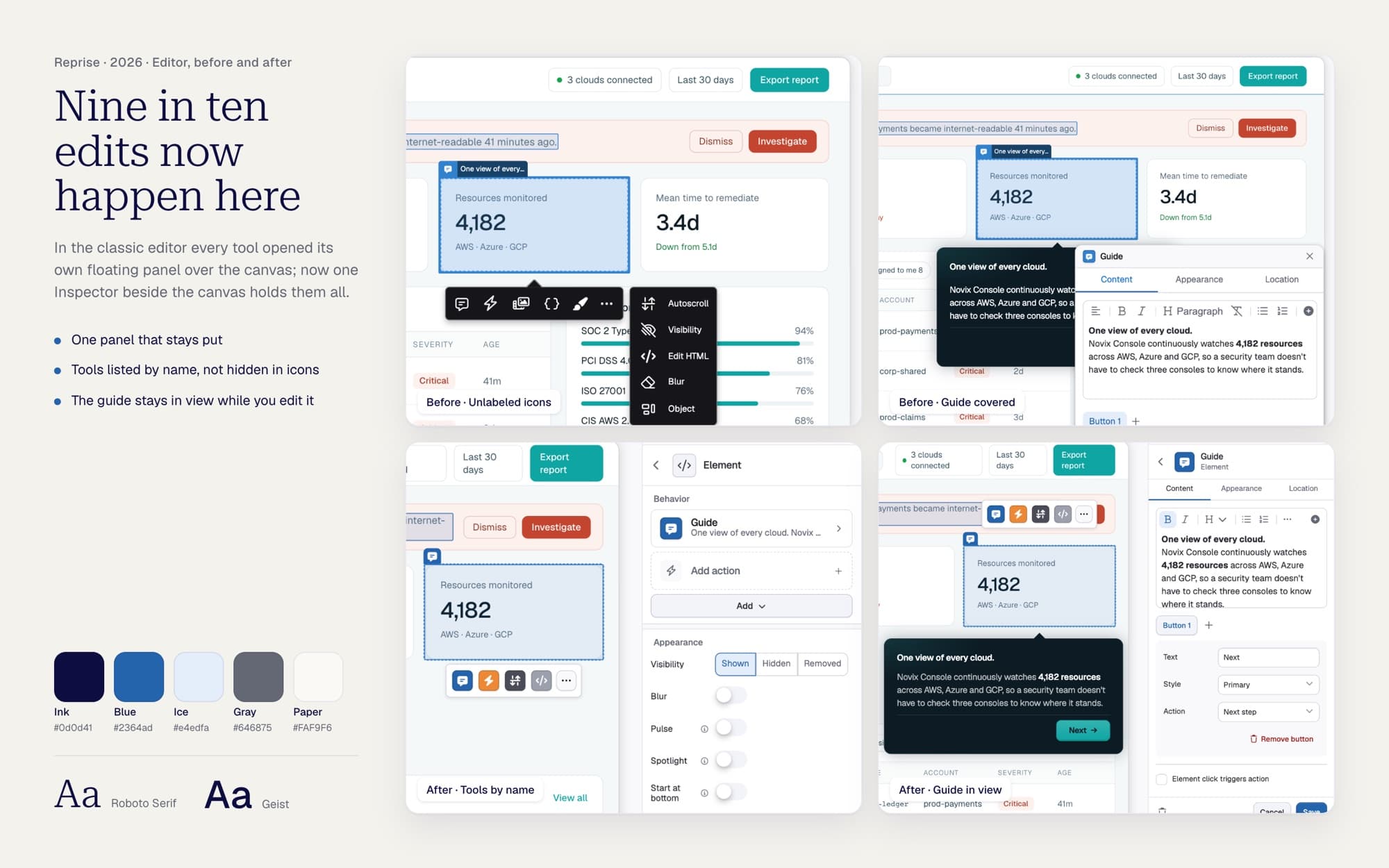
One Inspector for every tool
Every edit at Reprise now happens in the editor I designed, with 3.4× fewer frustrated clicks than the one it replaced.
- Type
- Design Delivery
- My Role
- Principal Designer
- Year
- Dec 2025 - Oct 2026
Enterprise sales engineers build Product Tours in Reprise's editor: guides, click actions, variables and objects. I first moved the old editor onto our design system, then designed the new editor's authoring model around one Inspector.
Engineering built the new editor's engine. I designed and shipped its authoring experience.
THE RESULTS
Every edit now happens in the new editor
 100% of edits since the classic editor retired on Oct 21
- Up from about 65% in early September.
- 3.4× fewer frustration signals (dead and rage clicks) per action than the classic editor.
- Find & Replace now changes every match, so a prospect's tour no longer shows the previous company's name.
- Reprise now builds and supports one editor, not two.
THE PROBLEM
Every tool opened its own floating panel over the canvas
- Each panel was built differently, and clicking away from one threw away what you had typed.
- Find & Replace changed only the first match, so a prospect's tour could still show the previous company's name.
- Variables had no list, and deleting one made the elements bound to it disappear.
- Guide bubbles blocked clicks, so authors deleted a guide just to edit what was underneath.
- The first version of the new editor floated tools over the canvas too.
WHAT I DECIDED
One panel that stays put
- One Inspector. Click anything and it shows every tool for that element. Select nothing and it shows the screen.
- Weight follows use. Tools are grouped Behavior, Appearance, Advanced, so how often a tool is used sets how prominent it is.
- Where you start says what you want. Start on an element and you get a guide attached to it. Start in the screen list and you get a floating one.
- If it affects the sequence, it's a step. A delay set on the gap between screens became Timed Advance, a step in the flow.
- Fix the system, not the 49th place. One shared panel row replaced 48 hand-built rows.
- What you pick is what you see. Seven of nine position dots used to put the guide somewhere else. One placement rule now, with a visual picker.
The Inspector with nothing selected, an element selected, and the guide's location picker.
The details follow the same rules: the Screen Flow rail, Add menus, device frames, themes and the unsaved-work prompt.
SHIPPING IT
Switching enterprise customers without breaking their tours
- A staff-only beta first, then both editors side by side during the move.
- A visible way back to the classic editor, shown only to customers who joined before launch.
- A parity audit of 110 capabilities in August: 95 at full parity, the rest tracked to a list.
- When one release hid the way back for everyone, the fix shipped about 19 hours later.
THE PATH
We changed course as customers taught us
- We removed the editor's canvas menu for one Inspector, then brought it back two days later, wired to it.
- In July two customers hit gaps (no typewriter effect, missing actions), and one escalated before a conference. We closed both by mid-August.
- When nearly every client company had already edited in the new editor, I made the case to switch everyone. Leadership agreed that day, and the classic editor was gone a week later.