An AI agent beside the work
Customers now build demos in one extension, by talking to an agent beside their work. Their own AI agents can join it too.
- Type
- Agentic Experience
- My Role
- Principal Designer
- Year
- May - Oct 2026
Reprise's engineers built what the agent can do. I designed the experience around it: the panel, how it shows its work, how it asks permission, and how it shows up in every product.
THE RESULTS
One extension, and an agent customers' own agents can join
 The old builder extensions were retired on Oct 22
- More than half of the people using the extension have started a screen capture.
- Customers connect their own AI agents to Reprise through a connector the team built, so the product now has two kinds of users: people and their agents.
- A dashboard once said nobody was opening the Agent, in a week it had switched on datasets and started captures. The tracking was broken, not the product. I fixed it, which is how we learned how much it was really used.
THE PROBLEM
Building a demo meant separate extensions and a click on every screen
- One extension to present, and three builders for tours, data injection and clones.
- A 30 to 50 screen tour meant clicking Capture, waiting and confirming, screen after screen.
- The panel opened straight into a chat, when the seller's real job was finding the demo for their next call.
I made the library the home of the panel, with the agent one switch away, so the agent sits beside the work and not in front of it.
SHOWS ITS WORK
Plain words, never a function name
The agent's work used to show up as raw function names. Now each turn is a short timeline of steps in plain language. A decline reads calm, a failure reads red, and the whole thing folds away when the answer arrives. If the result card says it, the chat doesn't repeat it.
The work timeline open while running, then folded to “Worked · 6 tools.”
TRUST
Before it spends money or touches a password, it asks
An agent acting inside a customer's own app can't be silent about it. I used a consent pattern people already know: Allow or Don't allow. It replaced an amber warning box and a per-site skip list. Nothing is drawn on the customer's page either, so warnings live in the agent's thread.
ONE AGENT, EVERYWHERE
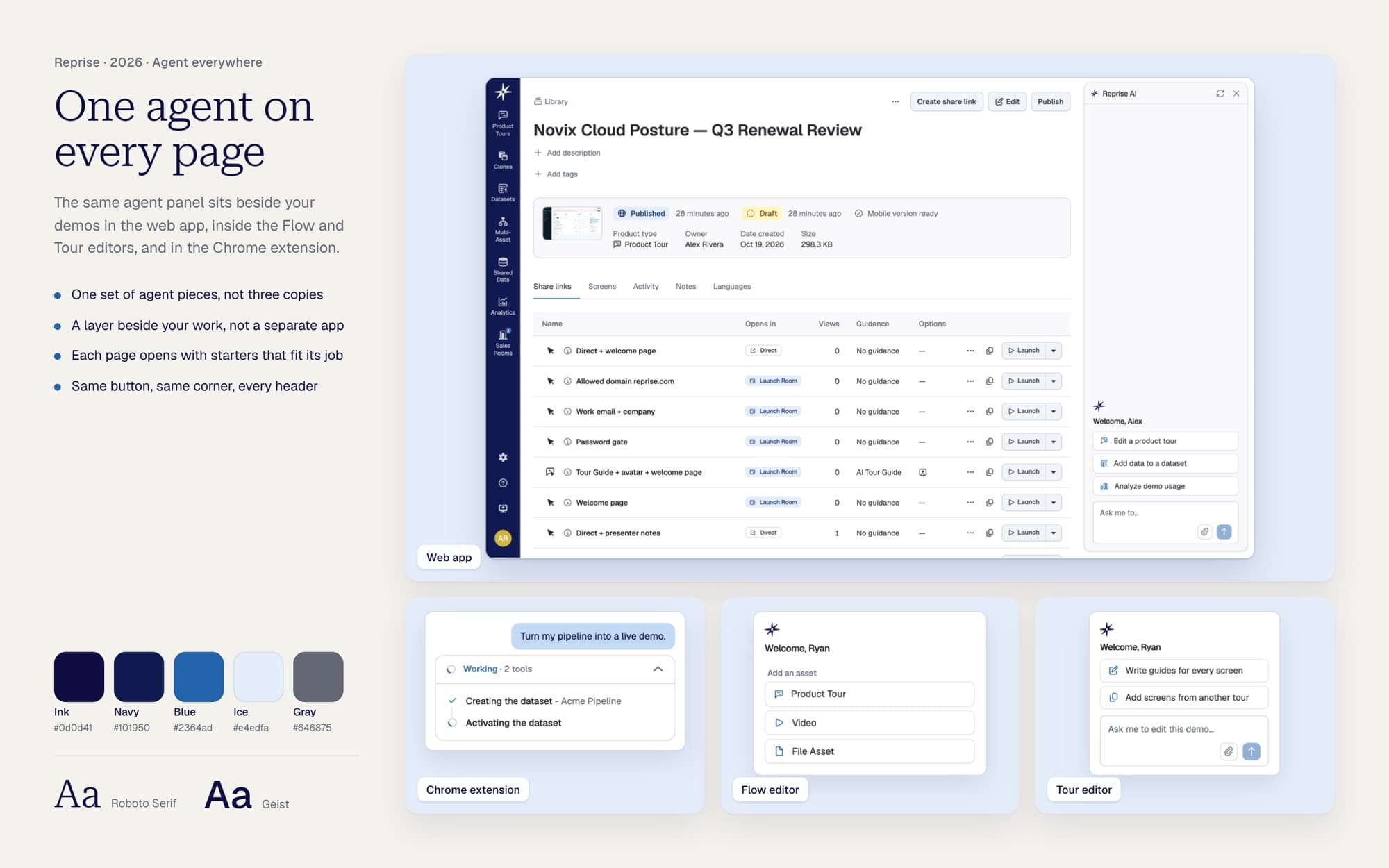
One set of pieces, not three copies
The Library, the flow editor and the tour editor each had their own agent panel, each slightly different. Now they're one set of pieces, with the Agent button in the same corner of every page, so the same answer reads the same everywhere.
The same request and the same answer in the Library, the Flow editor and the Tour editor.
CAPTURE
Capture as you click, and end on a card you can act on
A Continuous switch captures as you demo, and the count only goes up once the server has saved the screen. A capture ends in a card you can preview, launch or share. Preview used to open a new tab and lose the agent. Now it stays in the same tab, so you can add guides, preview and keep editing by asking.